
Platformer Progress - Test Run of Digitized Model into Sprite, Muffins
Hello again to everyone, so as my last blog post or few made mention, Id been looking into a little bit of the "Donkey Kong Country" route with some props. Where in meaning, I planned to try and make a 3D model and effectively convert animation of it rotating or likewise into a 2D sprite form.
The process in which I got to this from last post was.. interesting.
So I knew from the start, I wanted to do this in a way I can not throw the style TOO far out of wack with, I wanted to keep it relatively Cel Shaded, so a lot of the recent time to now was learning both about trying to model just enough to do this, as well as setting up basic shaders.
It was a bit rough, and for some reason in Grayscale, but this wasn't a problem that I was unprepared to work with.
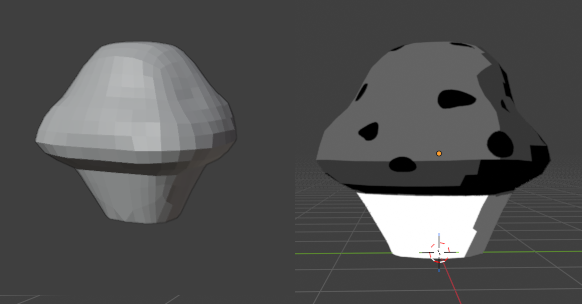
From this I made it rotate a full 360 using a few easy keyframes worth about 24 total frames.
Exported the individual frames to a folder, manually put all of them side by side, removed the backgrounds and edited down the size of the images
A bit of manual touch-up to apply some fixed outlines to odd jagged bits, and I ended up with these two, I made a small version, and a somewhat bigger version as at least trial runs unless they work out first try.
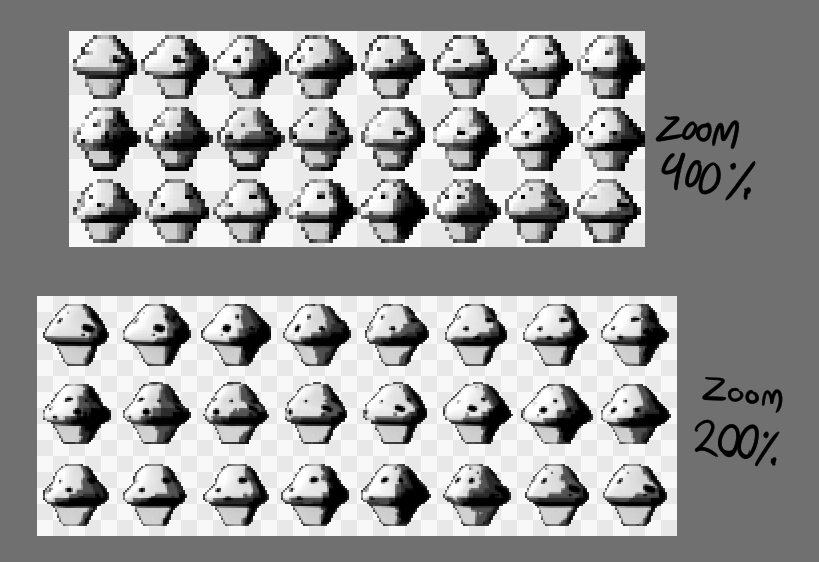
Each frame of rotation condensed down and near ready to trial run off of (will elaborate on in a moment), I made the model itself all asymmetrical intentionally to give it a more "natural" or "real object" feel.
Quality might be a bit scuffed, tried to use a gif to save space, sorry if it looks a bit messed up.

Now the problem you might be immediately noticing and thinking,
"But these Muffins are still Greyscale, that looks out of place doesn't it?"
Well, that does actually come with a benefit for me. I am an artist type by default, so I will ALWAYS have means to an art program like Firealpaca or Clip Studio on hand, and plus side for them, I can just.. manually put the colors on by highlighting areas and setting the color layer to "Multiply" or "Darken" or whatever to fix that.
A rough idea, but an example:
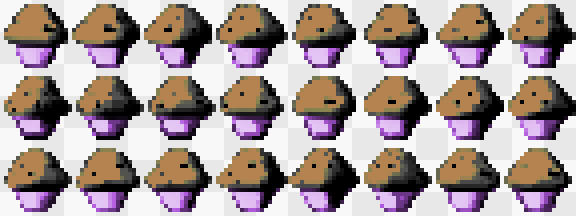
For me this is double useful, as I want to give the Muffins different colored wrappers for different values, probably nothing TOO crazy though.
In mind, I can make the smaller ones 1, 2, 5,
and the bigger ones 10, 20/25, and if inclined to go a bit nutty with it, hidden 50s or 100s. (I am working still on what those colors would actually be however)
If the visuals work, or if needed after a light bit of visual touch-ups, I can IMMEDIATELY move on to collection code with visual effect like upping a counter and all that good stuff.
This is the kind of idea I wanted to do also with the big collectible coin objects, so if it works on the Muffins, then the Coin Pieces will be a natural step up in regards to more choice complex detailing.
That's something I would have to update later on however as I'd need to get it implimented, so for now at least, this will have to be all for now from me.


Comments